PresentMGR
The presentation manager for live events

Every presenter. Every file. Every cue. Handled.

PresentMGR collects every speaker's deck, locks the version that goes on screen, and puts each presenter's notes, timer and Next button on their own phone. On show day it runs on the venue network, so your show never waits on the Wi‑Fi.

Free during the beta · Works with PowerPoint and Keynote · Built by an event producer

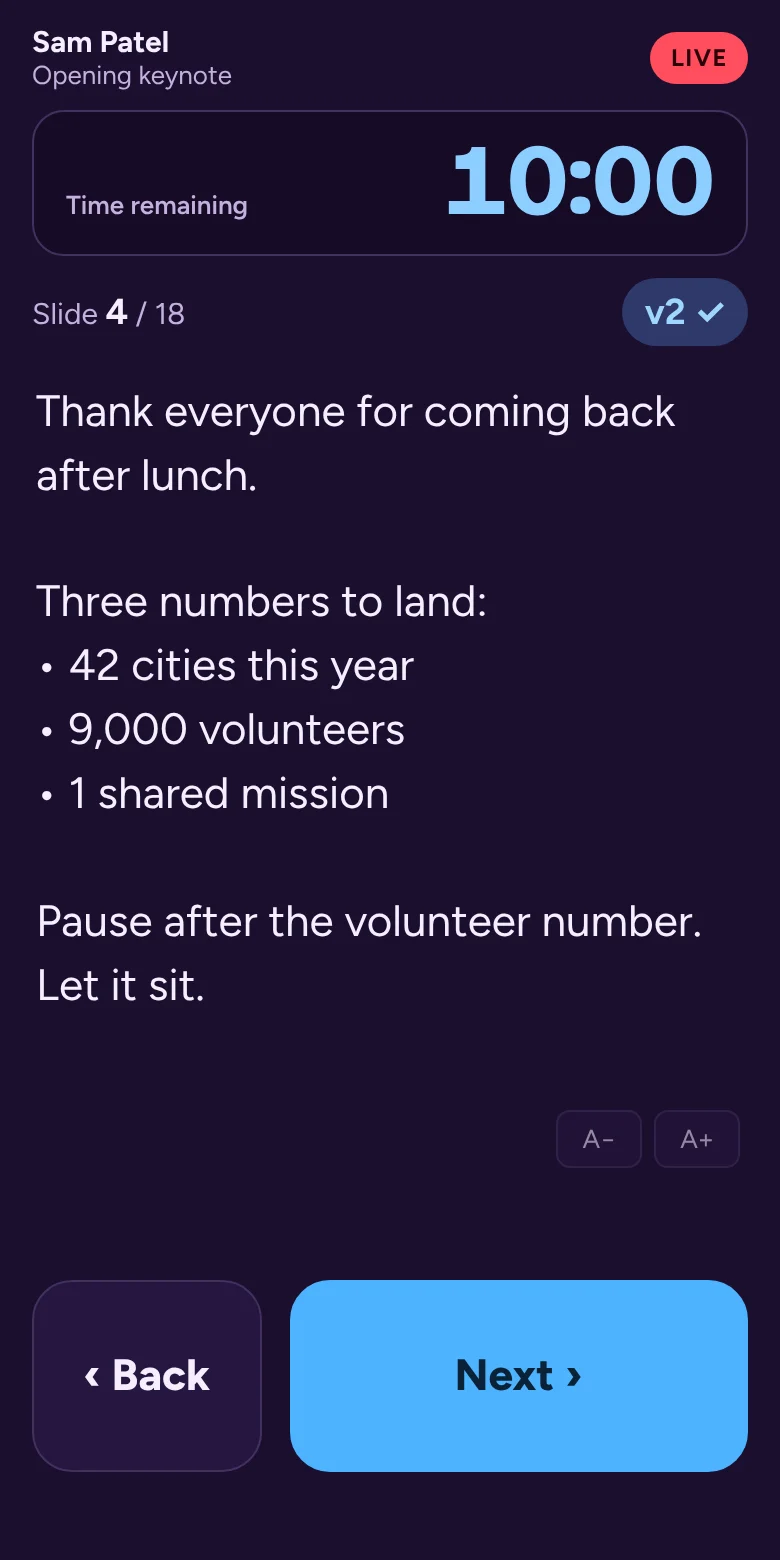
A presenter's phone during a live session: speaker notes in large type, a countdown timer, the version on air marked v2 with a check, and big Back and Next buttons.
Sound familiar?

The show is in four hours. The deck is still changing.

"Which one is final? final_FINAL_v7?"

Decks arrive by email, link and thumb drive. Nobody is sure which version is the one that goes on screen.

"Can you send your slides by Friday?"

You chase twelve speakers across three time zones, then build a spreadsheet just to know who's missing.

"Next slide, please."

The presenter loses their rhythm, the operator guesses the cue, and the room feels every second of it.

"Where are my notes?"

The confidence monitor is across the stage, the notes are on someone else's laptop, and the speaker is on in thirty seconds.

"They're 9 minutes over."

Wrap-up cues get missed when the timer lives on a laptop the speaker can't see.

"The Wi‑Fi just dropped."

Cloud tools are great until a ballroom full of phones takes the network down, right before the keynote.

You make other people look brilliant. PresentMGR is built to take the panic out of that job, so the show feels as calm as it looks from the audience.

How it works

Plan in the cloud. Present from a phone. Run it from one Mac.

Each part of PresentMGR has its own color, so everyone always knows where they are.

PLAN · CLOUD WORKSPACE

Collect everything before the event

  • Build the event: rooms, sessions, running order.
  • Invite speakers to upload their own files. Every upload is saved as its own version.
  • See at a glance who's in, who's missing and what changed.
  • Invite your team to prepare with you.
PRESENT · SPEAKER'S PHONE

Notes and Next, in their hand

  • Speakers scan a QR code. No app to install.
  • Large speaker notes that follow the slides.
  • Their own timer, cues from the host, and a Next button.
  • The version on air is shown, so there's no second-guessing.
RUN · BACK OF HOUSE

A calm show computer

  • One Go Live checklist: computer, files, phones, ready.
  • Opens the right file in PowerPoint or Keynote and starts the slideshow.
  • Take back control any time with one button.
  • Runs on the local network. No internet needed during the show.
Show day

Built for the person at the show computer at 7:58 a.m.

Dark, low-glare screens for the back of the room. Every check you'd do by hand, done in one place.

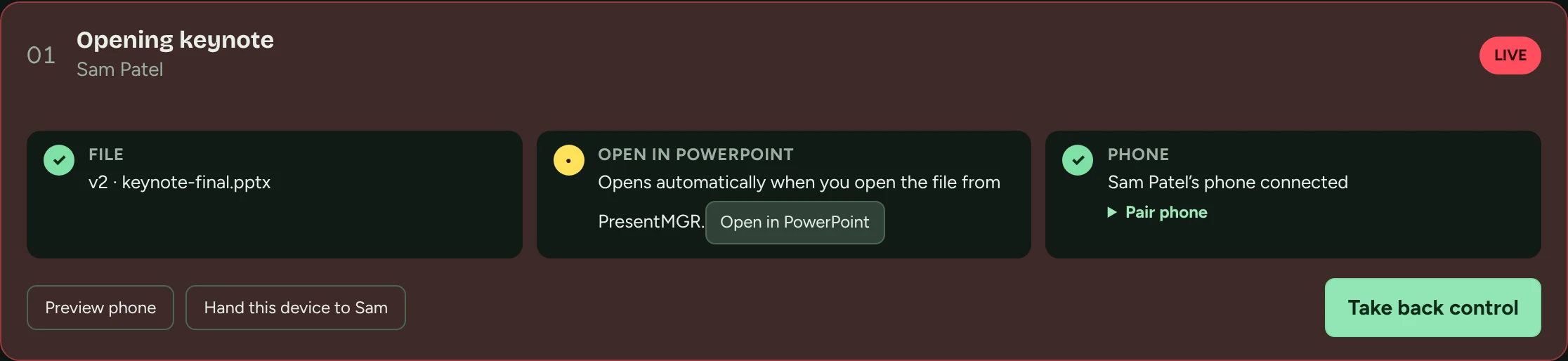
A live session card: the file (version 2) is checked, it opens in PowerPoint, the presenter's phone is connected, with buttons to preview the phone, hand over a device, and take back control.

Versions you can trust

Every upload is kept. Nothing reaches the screen until you choose it, and a newer upload during a live session is flagged, never swapped in.

Control that survives a refresh

If a presenter's phone reloads or drops off the Wi‑Fi, it gets control back by itself. Only the host can take it away.

Host always wins

Take back control from a bar that never leaves the screen. The presenter can ask for it back with one tap.

Hand over the laptop

No phone? Turn the show computer into the presenter's controls, with an optional PIN to get back.

Speaker timer and cues

Start the clock on Go Live. Send "wrap up" or a custom note straight to the speaker's phone.

Offline by design

Files come down before doors open. If the venue's internet dies, the show keeps going.

Who it's for

For the people who make events run

Event & meeting planners

One place for every deck

Stop living in your inbox. Know who has submitted, what changed, and that the right file will be on screen, without chasing anyone at midnight.

Speaker coordinators

Speakers who feel looked after

Give each presenter a simple link to upload, check what's on air and see their briefing. They walk on stage knowing exactly what to expect.

Show callers & producers

A running order you can trust

Go Live in one step, keep speakers on time with their own timer, and keep host control within reach for the whole show.

Why we built it

Made by people who've stood at the back of the room

I've spent my career producing live and recorded work, and the hardest part of a show is rarely what the audience sees. It's the last-minute deck, the version mix-up, the speaker who can't find their notes, and the minutes lost between presenters.

We built PresentMGR at CFTI to fix that for our own events first. It's built around how real shows run: files change, Wi‑Fi fails, and the host always needs a way to take control. Now we're opening it up to the people who do this work every week, and we'd love you to help shape it.

Roger · Founder, CFTI

The Green Room

Join the community behind the show

The Green Room is where event planners, speaker coordinators and show callers swap what works, and where PresentMGR gets shaped by the people who use it.

  • ★Beta invitations first. Members get early access, starting with people who have an event coming up.
  • ✎Field notes. Short, practical emails: speaker-ready checklists, run-of-show templates and lessons from real shows.
  • ↺A say in the roadmap. Tell us what breaks at your events. We build from what members tell us.
  • ☺Your people. Meetups and a members' chat open once we're big enough to make them good.

Get early access

We'll only use your details to send PresentMGR community emails. Privacy

Questions

The details

Do we need internet at the venue?

Not during the show. Files come down to the show computer ahead of time. On show day, presenter phones connect to the show computer over the venue's local Wi‑Fi. If the internet goes out, the show keeps running.

Which presentation apps does it work with?

PowerPoint and Keynote today, using their native files, so fonts, animations and video play the way the speaker built them. Google Slides and PDF support are next on the roadmap.

What do I need to run a show?

A Mac as the show computer with PowerPoint or Keynote installed, and the PresentMGR app. Presenters use any phone with a web browser. There's nothing for them to install.

Do speakers need an account?

No. Speakers who upload their own files sign in with the email you invite. On show day they scan a QR code to get their notes and controls.

What happens if a phone loses connection mid-talk?

It reconnects and gets control back automatically. The host can take over at any moment from the show computer, and the presenter can ask to have control back.

How much does it cost?

It's free during the beta. We'll share pricing with Green Room members before anything changes, and beta testers will be looked after.

Who's behind PresentMGR?

PresentMGR is a product of CFTI (Comedy For The Internet Inc.), a production company working across commercial production, media and content.

Make your next show the calm one.

Join the Green Room for early access, field notes from real events, and a say in what we build next.

Join the Green Room